I cannot preview videos that I upload to my project.

VT_91 wrote on 10/31/2018, 2:48 PM

I upload videos, start new projects and for some reason the preview screen remains black.

I was unable to find a tutorial that would explain why this is happening.

Why can't I see the video?

I tried to make a low-budget film with many still frames (similar to PowerPoint presentation with narration) and I was unable to see the slide images. When I rendered the video, it came out completely as a black screen.

What should I do? Could I accidentally 'mute' the video somehow?

Thank you.
Comments

vkmast wrote on 10/31/2018, 4:27 PM

First, check your setting in Options menu > Mute All Video.

VT_91 wrote on 10/31/2018, 5:32 PM

I accidentally muted video. Thank you. Problem solved.

Toffan wrote on 4/27/2020, 5:51 AM

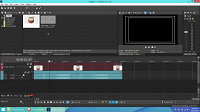
I didn't mute video but i can't see my video

j-v wrote on 4/27/2020, 5:59 AM

I didn't mute video but i can't see my video

Show also what is on the tracks 1-6


met vriendelijke groet
Marten

Camera : Pan X900, GoPro Hero7 Hero Black, DJI Osmo Pocket, Samsung Galaxy A8
Desktop :MB Gigabyte Z390M, W11 home version 24H2, i7 9700 4.7Ghz,16 DDR4 GB RAM, Gef. GTX 1660 Ti with driver
566.14 Studiodriver and Intel HD graphics 630 with driver 31.0.101.2130
Laptop  :Asus ROG Str G712L, W11 home version 25H2, CPU i7-10875H, 16 GB RAM, NVIDIA GeForce RTX 2070 with Studiodriver 591.86 and Intel UHD Graphics 630 with driver 26.20.100.7985
Vegas software: VP 10 to 23 and VMS(pl) 10,12 to 17.
TV      :LG 4K 55EG960V

My slogan is: BE OR BECOME A STEM CELL DONOR!!! (because it saved my life in 2016)


Toffan wrote on 4/27/2020, 6:16 AM

vkmast wrote on 4/27/2020, 6:25 AM

Try turning Solo (S) off on track 6.

Toffan wrote on 4/27/2020, 7:01 AM

how to do that?

oh it's fixed.thanks.


Dexcon wrote on 4/27/2020, 7:06 AM

In your 2nd image, notice that the S icon on the track header is activated. That means that only that track is going to display - all the other tracks are eliminated from display. Click on the S (solo) icon to de-activate it so that all tracks display.

Cameras: Sony FDR-AX100E; GoPro Hero 11 Black Creator Edition; Samsung S23 Ultra smart phone

Installed: Vegas Pro 13, 15, 16, 17, 18, 19, 20, 21, 22 & 23, HitFilm Pro 2021.3, DaVinci Resolve Studio 20.3, BCC 2026, Mocha Pro 2026, NBFX TotalFX 7, Neat NR 6, DVD Architect 6.0, MAGIX Travel Maps, Sound Forge Pro 16, SpectraLayers Pro 12, iZotope RX11 Advanced and many other iZ plugins, Vegasaur 4.0

Windows 11 25H2

Dell Alienware Aurora 11:

10th Gen Intel i9 10900KF - 10 cores (20 threads) - 3.7 to 5.3 GHz

NVIDIA GeForce RTX 2080 SUPER 8GB GDDR6 - liquid cooled

64GB RAM - Dual Channel HyperX FURY DDR4 XMP at 3200MHz

C drive: 2TB Samsung 990 PCIe 4.0 NVMe M.2 PCIe SSD

D: drive: 4TB Samsung 870 SATA SSD (used for media for editing current projects)

E: drive: 2TB Samsung 870 SATA SSD

F: drive: 6TB WD 7200 rpm Black HDD 3.5"

Dell Ultrasharp 32" 4K Color Calibrated Monitor


LAPTOP:

Dell Inspiron 5310 EVO 13.3"

i5-11320H CPU

C Drive: 1TB Corsair Gen4 NVMe M.2 2230 SSD (upgraded from the original 500 GB SSD)

Monitor is 2560 x 1600 @ 60 Hz