Text Bar

Opi wrote on 7/22/2018, 3:48 PM

So I've been working on this project for 5 days now on Sony vegas pro and now I'm in tears.

Basically I put some text on my video *default text* it was going all fine and well managed to finish it saved it, end of story.

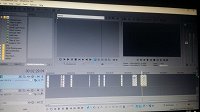
Went back to fix a few things 1) I wanted to render it cause I didn't think it would work on other platforms *please bare my stupidity* like a moron I rendered it from watching a youtube video AND NOW MY TEXT WON'T DISPLAY. It's there but it doesn't show up on the video I made and the text bar I grey. I Googled to see if I could fix and and nothing helped. From making sure I didn't solo out the audio or checking that my mute audio button was unchecked it's still isn't helping. Pleaseeeeeeee could someone help. I'm attaching a screen shot below.
Comments

vkmast wrote on 7/22/2018, 4:30 PM

See the status of your Mute All Video in the Options menu.

Opi wrote on 7/23/2018, 4:47 AM

@vkmast hey thank you for the suggestion but it still didn't work sadly

Opi wrote on 7/23/2018, 4:49 AM

[[MENTION:82477]] thank you for the video I appreciate it a lot but it didn't work. I don't know what I did wrong but it just won't let my text appear

redpaw wrote on 7/23/2018, 5:09 AM

@Opi maybe you have 'S' ( S - mutes all the other tracks apart from the one chosen) clicked on one of the tracks below your text track ?

Opi wrote on 7/23/2018, 5:22 AM

@redpaw YOU GOD SENT HUMAN!!!! Thank you so so very much. You were right my wee 's' was muted *I'm an idiot* but seriously thank you so much.


And thankyou to @vkmast & [[MENTION:82477]] for your help too.

All of you are legends. Thank you again

redpaw wrote on 7/23/2018, 5:28 AM

@Opi  Excellent! Glad i could be of help. ...and i woudnt be so hard on yourself (guess how i assumed it could have been that 😆 )

vkmast wrote on 7/23/2018, 5:35 AM

Yes, any chance there's a muted and soloed video track hiding under your video bus track? Hover your mouse over the border between the docking area and the timeline area to see the splitter (two-header arrow). Try to drag it up. (Easier to scroll on the vertical bar:))

edit: I see you found your solution. Good.