Text edits won't apply to my video

LullaBelle wrote on 7/1/2018, 7:35 AM

I just downloaded VEGAS Pro 15 Edit and I'm having problems with my text edits not updating. They're stuck in size 48 and font Verdana. My track isn't muted and solo isn't selected. Here's what I mean:
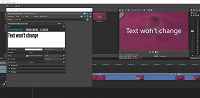
Help is appreciated. I've tried other's solutions, but they haven't worked for me.

Not sure what info you may need, but I'm on an XPS 15 9570 i7-8750H CPU @ 2.20GHz using Windows 10 Pro.

Comments

diverG wrote on 7/1/2018, 4:03 PM

Suggest you download the manual for your editor.  Ctrl F 'text' takes you straight to the text editor.

https://www.vegascreativesoftware.com/gb/downloads/

A very useful manual. 

Best of luck  happy editing.

G

Sys 1 Gig Z-890-UD, i9 285K @ 3.7 Ghz 64gb ram, 250gb SSD system, Plus 2x2Tb m2,  GTX 4060 ti, BMIP4k video out. Vegas 19 & V22(250), Edius 8.3WG and DVResolve 20.2 Studio. Win 11 Pro. Latest graphic drivers.

Sys 2 Laptop 'Clevo' i7 6700K @ 3.0ghz, 16gb ram, 250gb SSd + 2Tb hdd,   nvidia 940 M graphics. VP19, Plus Edius 8WG Win 10 Pro (22H2) Resolve18


LullaBelle wrote on 7/1/2018, 4:27 PM

I've already looked in the manual, one of the first things I did, but nothing seemed to help.

vkmast wrote on 7/1/2018, 5:07 PM

I assume your text was still selected when you changed font and size.

(The above is from the manual but you can get the same as instant help when you click ? in the T&T window.)

If it was selected, do your adjustments show in the Preview window after you close the T&T window? If they do, see if Unofficial known issues, GPU-related, point 4 in this thread apply to your issue. (In that case read at least the thread that opens when you click that blue text in point 4)

If those don't help, see if the text gets updated when you use a more common font.

LullaBelle wrote on 7/2/2018, 8:22 AM

@vkmast Something so simple as it having to do with the font itself. Thank you. Don't know why I was so hung up about that specific font. After going through some settings, I have another question.

I have the NVIDIA processor selected in the NVIDIA settings.

I also have it selected for video processing in VEGAS.

Is that not right? Shouldn't they both be selected? Using NVIDIA for both doesn't allow my edits to show in the preview video. Changing the setting in VEGAS does.

vkmast wrote on 7/2/2018, 8:44 AM

@LullaBelle please post your Nvidia question in a new post to get replies from users that have Nvidia.

felipe-martinssilveiralima wrote on 7/3/2018, 8:59 AM

Try to use legacy text at midia generators