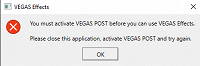
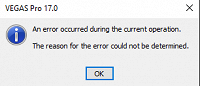
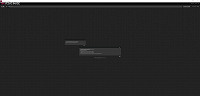
Hello I just bought VEGAS POST 365 and I tried to install it on 2 of my PCs but when I try to open VEGAS Effects from my start menu it says "You must activate VEGAS POST before you can use VEGAS Effects. Please close this application, activate VEGAS POST and try again." and if I try to open it through VEGAS Pro 17 it says "An error occurred during the current operation. The reason for the error could not be determined.". Also my VEGAS Image opens but the all the text is super small and can not read it. any help is greatly appreciated, thanks
.
PC 1 SPECS
CPU: AMD Ryzen 5 2600x
GPU: MSI GTX 950 2gb
RAM: 16gb Corsair Vengeance @ 3000Mhz
OS: Windows 10
VEGAS Pro 17.0 build 421
PC 2 SPECS
CPU: Intel I7-6700k @ 4.30ghz
GPU: MSI GTX 1080 8gb
RAM: 16gb Corsair Vengeance @ 2800Mhz
OS: Windows 10
VEGAS Pro 17.0 build 421
