Velocity - Dont show up - Geschwindigkeit - Wird nicht angezeigt

Albert-Zorin wrote on 5/2/2020, 11:00 AM

Hey guys,


first of all I have an german version of sony vegas 16 platinum.


I wanted to create velocity in my project.

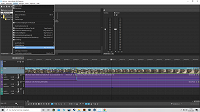
So I right clicked my video clip and choosed "Hüllkurve einfügen / entfernen" (Eng.:Insert/Remove Envelope).

Afterwards, I have only the option to freeze the videoclip on one frame.... thats not what I wanted.

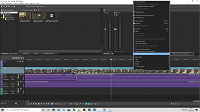
Further I check my Ansicht (Eng.: View) if the Envelopes are checked, as in the foto seen, this option is checked.


Can somebody help me?


Thank you verry much and have a nice day.


Comments

vkmast wrote on 5/2/2020, 11:11 AM

You need VEGAS Pro for that, sorry.

j-v wrote on 5/2/2020, 11:19 AM

You need to use another option in VMS.

met vriendelijke groet
Marten

Camera : Pan X900, GoPro Hero7 Hero Black, DJI Osmo Pocket, Samsung Galaxy A8
Desktop :MB Gigabyte Z390M, W11 home version 24H2, i7 9700 4.7Ghz,16 DDR4 GB RAM, Gef. GTX 1660 Ti with driver
566.14 Studiodriver and Intel HD graphics 630 with driver 31.0.101.2130
Laptop  :Asus ROG Str G712L, W11 home version 25H2, CPU i7-10875H, 16 GB RAM, NVIDIA GeForce RTX 2070 with Studiodriver 591.86 and Intel UHD Graphics 630 with driver 26.20.100.7985
Vegas software: VP 10 to 23 and VMS(pl) 10,12 to 17.
TV      :LG 4K 55EG960V

My slogan is: BE OR BECOME A STEM CELL DONOR!!! (because it saved my life in 2016)


Albert-Zorin wrote on 5/2/2020, 11:22 AM

You need to use another option in VMS.

only with ctrl and drag the clips up ?


j-v wrote on 5/2/2020, 11:23 AM

👍

met vriendelijke groet
Marten

Camera : Pan X900, GoPro Hero7 Hero Black, DJI Osmo Pocket, Samsung Galaxy A8
Desktop :MB Gigabyte Z390M, W11 home version 24H2, i7 9700 4.7Ghz,16 DDR4 GB RAM, Gef. GTX 1660 Ti with driver
566.14 Studiodriver and Intel HD graphics 630 with driver 31.0.101.2130
Laptop  :Asus ROG Str G712L, W11 home version 25H2, CPU i7-10875H, 16 GB RAM, NVIDIA GeForce RTX 2070 with Studiodriver 591.86 and Intel UHD Graphics 630 with driver 26.20.100.7985
Vegas software: VP 10 to 23 and VMS(pl) 10,12 to 17.
TV      :LG 4K 55EG960V

My slogan is: BE OR BECOME A STEM CELL DONOR!!! (because it saved my life in 2016)


Albert-Zorin wrote on 5/3/2020, 7:13 AM

You need VEGAS Pro for that, sorry.

could I use sony vegas 17 suite for volcity ?

j-v wrote on 5/3/2020, 7:19 AM

could I use sony vegas 17 suite for volcity ?

That program does not exist but Vegas Pro 17 edit will do it.


met vriendelijke groet
Marten

Camera : Pan X900, GoPro Hero7 Hero Black, DJI Osmo Pocket, Samsung Galaxy A8
Desktop :MB Gigabyte Z390M, W11 home version 24H2, i7 9700 4.7Ghz,16 DDR4 GB RAM, Gef. GTX 1660 Ti with driver
566.14 Studiodriver and Intel HD graphics 630 with driver 31.0.101.2130
Laptop  :Asus ROG Str G712L, W11 home version 25H2, CPU i7-10875H, 16 GB RAM, NVIDIA GeForce RTX 2070 with Studiodriver 591.86 and Intel UHD Graphics 630 with driver 26.20.100.7985
Vegas software: VP 10 to 23 and VMS(pl) 10,12 to 17.
TV      :LG 4K 55EG960V

My slogan is: BE OR BECOME A STEM CELL DONOR!!! (because it saved my life in 2016)


Albert-Zorin wrote on 5/3/2020, 7:22 AM

could I use sony vegas 17 suite for volcity ?

That program does not exist but Vegas Pro 17 edit will do it.


Hm i have the option to upgrade my sony vegas to this : Upgrade: VEGAS Movie Studio 17 Suite

or this: Upgrade: VEGAS Movie Studio 17 Platinum

i cant see the diffrence for now.... the last upgrade option is vegas pro


vkmast wrote on 5/3/2020, 7:35 AM

https://www.vegascreativesoftware.com/de/

j-v wrote on 5/3/2020, 7:41 AM

Hm i have the option to upgrade my sony vegas to this : Upgrade: VEGAS Movie Studio 17 Suite

or this: Upgrade: VEGAS Movie Studio 17 Platinum

i cant see the diffrence for now.... the last upgrade option is vegas pro

There is no difference, the Suite has some extra's as 3th party plugins.
Both has nothing to do with Vegas Pro, the upgrade possibility to that program is @vkmast showing you.

met vriendelijke groet
Marten

Camera : Pan X900, GoPro Hero7 Hero Black, DJI Osmo Pocket, Samsung Galaxy A8
Desktop :MB Gigabyte Z390M, W11 home version 24H2, i7 9700 4.7Ghz,16 DDR4 GB RAM, Gef. GTX 1660 Ti with driver
566.14 Studiodriver and Intel HD graphics 630 with driver 31.0.101.2130
Laptop  :Asus ROG Str G712L, W11 home version 25H2, CPU i7-10875H, 16 GB RAM, NVIDIA GeForce RTX 2070 with Studiodriver 591.86 and Intel UHD Graphics 630 with driver 26.20.100.7985
Vegas software: VP 10 to 23 and VMS(pl) 10,12 to 17.
TV      :LG 4K 55EG960V

My slogan is: BE OR BECOME A STEM CELL DONOR!!! (because it saved my life in 2016)