Video FX Window Sizing Issue

HeckinTeagan wrote on 4/26/2025, 4:42 PM

Edit: issue solved. I installed this font and it fixed it immediately, without any restart.
https://github.com/taveevut/Windows-10-Fonts-Default/blob/master/sserife.fon

ย 

Hi Team!

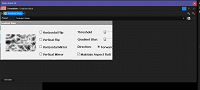
I'm having an issue with my Video FX Window size in Vegas Pro 22 when trying to change settings for a video FX. It won't show the full options, and is randomly cut off. Please see attached for a better example.

I tried disabled the auto window resize for video fx windows in the preferences but it didn't seem to help.
Thanks!
Comments

zzzzzz9125 wrote on 4/26/2025, 7:07 PM

@HeckinTeagan Try all the solutions mentioned in this post: https://www.vegascreativesoftware.info/us/forum/credit-roll-window-not-displaying-in-full--138828/

Oh, I didn't find it solved. ๐Ÿ‘

Last changed by zzzzzz9125 on 4/26/2025, 7:10 PM, changed a total of 1 times.

Using VEGAS Pro 22 build 250 & VEGAS Pro 21 build 208.

Information about my PC:
Brand Name: HP VICTUS Laptop
System: Windows 11.0 (64-bit) 10.00.22631
CPU: 12th Gen Intel(R) Core(TM) i7-12700H
GPU: NVIDIA GeForce RTX 3050 Laptop GPU
GPU Driver: NVIDIA Studio Driver 560.70

Reyfox wrote on 4/28/2025, 8:06 AM

Using VP22 B248 with Auto FX window resizing check marked, and not changing any fonts, everything is there.

Newbie๐Ÿ˜

Vegas Pro 23 B356 (VP18-22 also installed)

Win 11 Pro 23H2 (Build 22631.6199)

AMD Ryzen 9 5950X 16 cores / 32 threads

64GB DDR4 3200 Patriot Viper

Sapphire RX6700XT 12GB Driver: 25.12.1

Gigabyte X570 Elite Motherboard

Panasonic G9, G7, FZ300

Boris FX Continuum Complete 2026, Newblue FX Total FX360, Ignite Pro V5, proDAD Vitascene V5 Pro and Mercalli V6 OFX

RogerS wrote on 4/28/2025, 8:30 AM

Didn't others solve this by your installing a particular font?

caioarrio wrote on 5/12/2025, 8:15 AM

102 / 5.000

I have the same problem but despite having tried all the previous solutions the problem was not solved

Reyfox wrote on 5/12/2025, 12:51 PM

@caioarrio wrote

I have the same problem but despite having tried all the previous solutions the problem was not solved

Which version and build?

Newbie๐Ÿ˜

Vegas Pro 23 B356 (VP18-22 also installed)

Win 11 Pro 23H2 (Build 22631.6199)

AMD Ryzen 9 5950X 16 cores / 32 threads

64GB DDR4 3200 Patriot Viper

Sapphire RX6700XT 12GB Driver: 25.12.1

Gigabyte X570 Elite Motherboard

Panasonic G9, G7, FZ300

Boris FX Continuum Complete 2026, Newblue FX Total FX360, Ignite Pro V5, proDAD Vitascene V5 Pro and Mercalli V6 OFX

vkmast wrote on 5/12/2025, 12:57 PM

Another thread that may or may not help:

https://www.vegascreativesoftware.info/us/forum/help-needed-large-font-issue-in-vegas-pro-menus--146652/