Activation of Sony Creative Software era applications

Comments

Jep wrote on 12/9/2025, 9:36 PM

@Jep  ... From memory, the Next button doesn't become available until all the mandatory personal details have been entered (and that may be more than just your name and email address) and at least the 2nd checkbox re the privacy policy at the bottom of the window has been checked.

In the words of Homer Simpson "DOH!!!". Thank you very much. That worked and DVDA 6.0 is activated and working.👌

Rich Parry wrote on 12/16/2025, 1:31 PM

I have tried many times, I can't activate VP13. I get Computer ID error, see attached screen shot. I am using the Computer ID obtained from "Settings / System / About ". Thanks in advance for help.

CPU Intel i9-13900K Raptor Lake

Heat Sink Noctua  NH-D15 chromas, Black

MB ASUS ProArt Z790 Creator WiFi

OS Drive Samsung 990 PRO  NVME M.2 SSD 1TB

Data Drive Samsung 870 EVO SATA 4TB

Backup Drive Samsung 870 EVO SATA 4TB

RAM Corsair Vengeance DDR5 64GB

GPU ASUS NVDIA GeForce GTX 1080 Ti

Case Fractal Torrent Black E-ATX

PSU Corsair HX1000i 80 Plus Platinum

OS MicroSoft Windows 11 Pro

Rich in San Diego, CA

VEGASDerek wrote on 12/16/2025, 2:45 PM

@Rich Parry

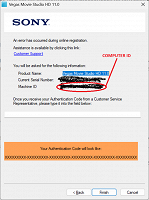
Wrong ID. The correct ID is provided to you on the registration screen.


VEGASDerek wrote on 12/16/2025, 2:53 PM

I should also add that I did go through this process an older Sony era application today to ensure everything still worked and it does work as expected.

Rich Parry wrote on 12/17/2025, 10:37 PM

Thank you for the help. I was able to create an Activation Code. The instruction say "Copy and paste the activation code provided into the field in the SCS era app prompt" however, when I open VP13 and complete the form, I am never asked for an activation code. Where do I supply the activation code? Thanks in advance.

30-60 seconds later I get this error.

CPU Intel i9-13900K Raptor Lake

Heat Sink Noctua  NH-D15 chromas, Black

MB ASUS ProArt Z790 Creator WiFi

OS Drive Samsung 990 PRO  NVME M.2 SSD 1TB

Data Drive Samsung 870 EVO SATA 4TB

Backup Drive Samsung 870 EVO SATA 4TB

RAM Corsair Vengeance DDR5 64GB

GPU ASUS NVDIA GeForce GTX 1080 Ti

Case Fractal Torrent Black E-ATX

PSU Corsair HX1000i 80 Plus Platinum

OS MicroSoft Windows 11 Pro

Rich in San Diego, CA

Dexcon wrote on 12/18/2025, 12:02 AM

@Rich Parry  ... You asked the same question in:

https://www.vegascreativesoftware.info/us/forum/activation-of-sony-creative-software-era-applications--149297/#ca946164

Please refer to the response that I provided in that thread that should have solved the problem for you ... as it already had for another forum member with the same activation issue.

Please specifically note in my response:

 ... keep proceeding with that window and it should create and display a computer ID in a new window.

... and VEGASDerek wrote later on the thread when you were apparently attempting to use a Computer ID generated from your computer rather than the Computer ID that is generated during the registration process:

The correct ID is provided to you on the registration screen.

Last changed by Dexcon on 12/18/2025, 12:28 AM, changed a total of 1 times.

Cameras: Sony FDR-AX100E; GoPro Hero 11 Black Creator Edition; Samsung S23 Ultra smart phone

Installed: Vegas Pro 13, 15, 16, 17, 18, 19, 20, 21, 22 & 23, HitFilm Pro 2021.3, DaVinci Resolve Studio 20.3, BCC 2026, Mocha Pro 2026, NBFX TotalFX 7, Neat NR 6, DVD Architect 6.0, MAGIX Travel Maps, Sound Forge Pro 16, SpectraLayers Pro 12, iZotope RX11 Advanced and many other iZ plugins, Vegasaur 4.0

Windows 11 25H2

Dell Alienware Aurora 11:

10th Gen Intel i9 10900KF - 10 cores (20 threads) - 3.7 to 5.3 GHz

NVIDIA GeForce RTX 2080 SUPER 8GB GDDR6 - liquid cooled

64GB RAM - Dual Channel HyperX FURY DDR4 XMP at 3200MHz

C drive: 2TB Samsung 990 PCIe 4.0 NVMe M.2 PCIe SSD

D: drive: 4TB Samsung 870 SATA SSD (used for media for editing current projects)

E: drive: 2TB Samsung 870 SATA SSD

F: drive: 6TB WD 7200 rpm Black HDD 3.5"

Dell Ultrasharp 32" 4K Color Calibrated Monitor


LAPTOP:

Dell Inspiron 5310 EVO 13.3"

i5-11320H CPU

C Drive: 1TB Corsair Gen4 NVMe M.2 2230 SSD (upgraded from the original 500 GB SSD)

Monitor is 2560 x 1600 @ 60 Hz

kevin-r5995 wrote on 12/27/2025, 1:35 PM

How can I pay for Vegas pro 23 through Paypal?

EricLNZ wrote on 12/27/2025, 7:02 PM

@kevin-r5995 You've posted in a thread about activating Sony Creative Software era applications but your post has nothing to do with this.

You need to post in the Vegas Pro area although as this is a user forum it's unlikely anyone here can help you. You may need to contact Magix sales.

Searching this forum for Paypal brings up a few posts. Comments at the end of this thread may help you https://www.vegascreativesoftware.info/us/forum/impossible-to-purchase--147263/#ca925823

Marc-Apfelstadt wrote on 1/15/2026, 4:48 PM

I have a current annual license for Vegas Pro 365. Doesn't that include Sound Forge 18? it was in the download!

I can't get a license number for SF 18... Magix refers me to the Vegas forum, but it's a current Magix product.

Caught between a (serial) rock and a hard place. I could drop back to SF 14 or 15 - but why do that if 18 is included in the bundle.

SF 18 doesn't, of course, recognize the current Vegas serial number.

EricLNZ wrote on 1/15/2026, 6:44 PM

@Marc-Apfelstadt Have you tried going to your Magix account where all your Magix/VEGAS products should be shown under My Products and your serial number should be there - https://www.magix.com/us/support/my-service-center/

vkmast wrote on 1/16/2026, 7:09 AM

@Marc-Apfelstadt do you have a subscription/license for VEGAS Pro 365 or VEGAS Pro Suite 365?

(Btw., this thread is for "Activation of Sony Creative Software era applications".)