Activation of Sony Creative Software era applications

VEGAS_CommunityManager wrote on 7/21/2025, 12:09 PM

If you own a license of an older version of Vegas Pro, Vegas Movie Studio, DVD Architect, Sound Forge or Acid Pro and are trying to activate it, you will no longer be able to use the original activation workflow. The reason for this is that this older software will try to connect to a Sony server which is now no longer in operation.

You may still activate your software using the off-line method by following these steps:

  • Log into the service center on vegascreativesoftware.com
  • Click "create activation code"
  • Type in the serial number for the SCS era software
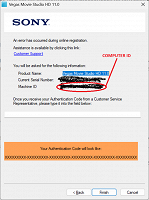
  • Type in the computer ID provided by the SCS era software when prompted
  • Copy and paste the activation code provided into the field in the SCS era app prompt. 
Comments

vkmast wrote on 7/22/2025, 3:12 AM

Currently still troubles with activating. Please see e.g. here:

https://www.vegascreativesoftware.info/us/forum/trying-to-register-movie-studio-plat-12-and-other-sony-vegas-versions--149269/#ca939080

vkmast wrote on 7/22/2025, 10:43 AM

Admin's comment here:

https://www.vegascreativesoftware.info/us/forum/trying-to-register-movie-studio-plat-12-and-other-sony-vegas-versions--149269/#ca939100

vkmast wrote on 7/23/2025, 5:49 AM

Update: several users confirm that Activation Code can now be created and the procedure works.

https://www.vegascreativesoftware.info/us/forum/trying-to-register-movie-studio-plat-12-and-other-sony-vegas-versions--149269/?page=2#ca939126

Steve-Pabst wrote on 9/4/2025, 12:30 PM

Ive followed all these instructions over and over

Log into the service center on vegascreativesoftware.com
Click "create activation code"
Type in the serial number for the SCS era software
Type in the computer ID provided by the SCS era software when prompted
Copy and paste the activation code provided into the field in the SCS era app prompt. 

Ive used my new computer ID, my old computer ID and ive even ade up a few just for the fun of it and it gives me the exact same Activation code (That it wont accept) every single time

B66G0-TB1YG-775D4-EZW9Y

It tells me i typed it wrong or i missed a letter or the caps lock is on ....it doesn't matter what i do it simply wont accept it.

Jeff-Lewis wrote on 9/15/2025, 8:34 PM

new to forum, attempting to resurrect licensed v 9.0e from a failing legacy Sony VAIO, and tried in vain to register (screen says license was accepted), but failing to generate an activation code (says not registered).

Jeffrey-Brody wrote on 9/18/2025, 5:00 PM

In trying to re-register Sony Sound Forge 9 I followed all the steps including the creation of a new authentication (activation?) code (the 3rd on he list of steps to take. . I saved it to my Documents folder. Then I double-clicked the file and still the Sony registration site does not open and I cannot go any further. What to do?

weston-j wrote on 9/20/2025, 2:07 AM

Thanks for clearing this up! I was stuck trying to figure out why the old Sony activation servers weren’t responding anymore. The offline method looks straightforward enough, glad there’s still a way to keep older versions running without having to give them up completely.

Steven-Drennon wrote on 9/28/2025, 12:50 PM

I have tried to follow these instructions, but I get a message that my product is already registered, so it will not allow me to proceed any further. It gives me a link to check the registration, but all that does is confirm that it has been registered. I had originally installed the software on a laptop that is old and being replaced, so I am trying to install to a different computer. However, it won't allow me to proceed.

Dexcon wrote on 9/29/2025, 3:24 AM

@Steven-Drennon  ... this may be another issue related to the number of activations allowed with Sony-era software aand addressed in point 9 in https://www.vegascreativesoftware.info/us/forum/vegas-pro-faqs-and-troubleshooting-guides--104787/

  • Older versions of Vegas Pro than 14.0 are licensed under a system (as previously used by Sony) which permits use on multiple computers by one user; after an unspecified number of installations on different or updated PCs you may need to contact support to reset your "installation count".

There's a Support link at the bottom of the following Support webpage found in the header of the forum:

https://www.vegascreativesoftware.info/us/support?category=168278&title=vegas-pro

BTW, I had this happen once or twice back in the Sony-era.

Cameras: Sony FDR-AX100E; GoPro Hero 11 Black Creator Edition; Samsung S23 Ultra smart phone

Installed: Vegas Pro 13, 15, 16, 17, 18, 19, 20, 21, 22 & 23, HitFilm Pro 2021.3, DaVinci Resolve Studio 20.2, BCC 2025.5, Mocha Pro 2025.5, NBFX TotalFX 7, Neat NR 6, DVD Architect 6.0, MAGIX Travel Maps, Sound Forge Pro 16, SpectraLayers Pro 12, iZotope RX11 Advanced and many other iZ plugins, Vegasaur 4.0

Windows 11

Dell Alienware Aurora 11:

10th Gen Intel i9 10900KF - 10 cores (20 threads) - 3.7 to 5.3 GHz

NVIDIA GeForce RTX 2080 SUPER 8GB GDDR6 - liquid cooled

64GB RAM - Dual Channel HyperX FURY DDR4 XMP at 3200MHz

C drive: 2TB Samsung 990 PCIe 4.0 NVMe M.2 PCIe SSD

D: drive: 4TB Samsung 870 SATA SSD (used for media for editing current projects)

E: drive: 2TB Samsung 870 SATA SSD

F: drive: 6TB WD 7200 rpm Black HDD 3.5"

Dell Ultrasharp 32" 4K Color Calibrated Monitor


LAPTOP:

Dell Inspiron 5310 EVO 13.3"

i5-11320H CPU

C Drive: 1TB Corsair Gen4 NVMe M.2 2230 SSD (upgraded from the original 500 GB SSD)

Monitor is 2560 x 1600 @ 60 Hz

Steve-Kessler wrote on 11/7/2025, 5:48 PM

new to forum, attempting to resurrect licensed v 9.0e from a failing legacy Sony VAIO, and tried in vain to register (screen says license was accepted), but failing to generate an activation code (says not registered).

I am having the same issue, also with Sound Forge Audio 9.0, have registered the S/N multiple times, but when trying to activate----after clicking Proceed----the website keeps saying product is not registered.

EricLNZ wrote on 11/7/2025, 7:14 PM

@Steve-Kessler Presumably you've looked at all the links in this thread. If nothing works suggest you contact Vegas Support.

Steve-Kessler wrote on 11/9/2025, 5:30 PM

@Steve-Kessler Presumably you've looked at all the links in this thread. If nothing works suggest you contact Vegas Support.

Have sent an email to Vegas Support. Crossing my fingers....

Jeff-Lewis wrote on 11/15/2025, 11:51 AM

(Definitely looked at all the links in this thread.) I'm caught in a loop of the Vegas 9 license being recognized, but then activation code sequence says product not registered. Support ticket gave me the pat instructions and never did answer head-on my problem (even after I sent screenshots), and then closed the ticket! I'm agreeing with an earlier poster that it seems I am being herded to buy a new version.

Steve-Kessler wrote on 11/17/2025, 6:07 PM

Finally heard back from MAGIX Support, and as @Jeff-Lewis suspected, yes we are being herded to buy a new version:

"Unfortunately, Sony has turned off the servers for the old Sony VEGAS and SOUND FORGE products on 01/08/2025, so that registration is now no longer possible. As this was a decision made by Sony, 
we are unfortunately unable to assist you with this problem.

However, you can upgrade to the latest version of the software with the old serial number. As you own a previous version, you can purchase the latest version at a discounted price. 
Further information as well as a free trial version can be found here:"

VEGAS PRO
https://www.vegascreativesoftware.com/int/vegas-pro/

SOUND FORGE PRO

https://www.magix.com/int/music/sound-forge/sound-forge-pro/

SOUND FORGE AUDIO STUDIO: 

https://www.magix.com/int/music/sound-forge/sound-forge-audio-studio/

ACID PRO 

https://www.magix.com/int/music/acid/acid-pro/

ACID MUSIC STUDIO

https://www.magix.com/int/music/acid/acid-music-studio/


EricLNZ wrote on 11/17/2025, 6:56 PM

@Steve-Kessler Sadly this appears to indicate that there are communication problems within Magix as my understanding is that while the old servers have been turned off users are not being herded to buy a newer version. This thread is about how old SCS products can be activated.

Steve, Did you contact MAGIX support or VEGAS support? I understand there is a difference.

Steve-Kessler wrote on 11/18/2025, 4:28 PM

@Steve-Kessler Sadly this appears to indicate that there are communication problems within Magix as my understanding is that while the old servers have been turned off users are not being herded to buy a newer version. This thread is about how old SCS products can be activated.

Steve, Did you contact MAGIX support or VEGAS support? I understand there is a difference.

I contacted MAGIX support and that above is their reply.

Martin-Fisher wrote on 12/4/2025, 9:08 AM

I have the same problem as Steve Drennon with the loop. "I have tried to follow these instructions, but I get a message that my product is already registered, so it will not allow me to proceed any further. It gives me a link to check the registration, but all that does is confirm that it has been registered." I have the program on an HP laptop and have been using it for years. I've had to re-register/activate it in the past many times but it worked every time. I understand that the old registration process is caput now but the program stopped working again for no reason and I'm stuck.

vkmast wrote on 12/4/2025, 10:00 AM

I've re-registered my Sony Vegas Pro 12 successfully on September 24, 2025. So the date 01/08/2025 quoted from "MAGIX Support" by Steve in his comment above seems odd. I haven't tried any further SCS era software registrations though.