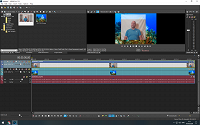
Can't get background changed and completely removed

EyeontheSky wrote on 5/6/2020, 5:20 PM


Hi

As i try this last 2 weeks and all pan/crop,Bezier Masking,Chroma Keyer and i went so many tutorials in YT and still i cant get the white background in total as it was 100% white background and then when using chroma keyer it's getting smaller but not gone completely even i try feathers and others, So where i do wrong and miss the final point?

Thank you for all the help again.

Comments

michael-harrison wrote on 5/6/2020, 5:59 PM

I don't see any way to make a white background work with a white person. The chroma key fx is going to have a hard time because it acts on the entire image.

Plus, you have some bad wrinkles and the shadow of the person in that background.

You need to look for green screen tutorials on youtube and swap that screen out for another color.

If you can't re-shoot, you're going to have to resort to frame by frame masking or purchasing a plugin (boris has a few) that will do the motion tracking and masking for you (mostly)

Last changed by michael-harrison on 5/6/2020, 6:01 PM, changed a total of 2 times.

System 1:

Windows 10
i9-10850K 10 Core
128.0G RAM
Nvidia RTX 3060 Studio driver [most likely latest]
Resolution        3840 x 2160 x 60 hertz
Video Memory 12G GDDR5


System 2:

Lenovo Yoga 720
Core i7-7700 2.8Ghz quad core, 8 logical
16G ram
Intel HD 630 gpu 1G vram
Nvidia GTX 1050 gpu 2G vram


EyeontheSky wrote on 5/6/2020, 6:12 PM

I don't see any way to make a white background work with a white person. The chroma key fx is going to have a hard time because it acts on the entire image.

Plus, you have some bad wrinkles and the shadow of the person in that background.

You need to look for green screen tutorials on youtube and swap that screen out for another color.

If you can't re-shoot, you're going to have to resort to frame by frame masking or purchasing a plugin (boris has a few) that will do the motion tracking and masking for you (mostly)

Thank you Michael, well i have done same same with Full orange, full Blue background and post in here before and this was just white and well it's not work even i do detail beszier all around my entire body and i did tracking as well and that took me 37min to complete 3m07sec tracking and still color stay

Musicvid wrote on 5/6/2020, 6:16 PM

Your lighting on the background must be perfectly even. It takes time to get It right. Plenty of tutorials here :

https://www.vegascreativesoftware.info/us/forum/new-users-consult-the-tutorials-first-please--118014/

michael-harrison wrote on 5/6/2020, 7:03 PM

The lighting doesn't have to be perfectly even but that should be your goal. Small variances in lighting *can* be ok depending, but character shadows and wrinkles are a huge no-no

System 1:

Windows 10
i9-10850K 10 Core
128.0G RAM
Nvidia RTX 3060 Studio driver [most likely latest]
Resolution        3840 x 2160 x 60 hertz
Video Memory 12G GDDR5


System 2:

Lenovo Yoga 720
Core i7-7700 2.8Ghz quad core, 8 logical
16G ram
Intel HD 630 gpu 1G vram
Nvidia GTX 1050 gpu 2G vram


Former user wrote on 5/6/2020, 7:37 PM

Your split screen preview button is enabled. That may be why you are not seeing your effx.

EyeontheSky wrote on 5/7/2020, 12:29 AM

Your split screen preview button is enabled. That may be why you are not seeing your effx.

Thank you Dot

that is not effecting at all as i try that as well and when double click it so turned off, it's just take away all picture colors.

michael-harrison wrote on 5/7/2020, 3:16 PM

You must have a BW fx set on the event.

You need to start over completely.

Re-shoot that scene with a blue or green background with as close to *no* wrinkles as possible and make sure the screen is as evenly lit as you can manage and that your shadow doesn't fall on the screen.

System 1:

Windows 10
i9-10850K 10 Core
128.0G RAM
Nvidia RTX 3060 Studio driver [most likely latest]
Resolution        3840 x 2160 x 60 hertz
Video Memory 12G GDDR5


System 2:

Lenovo Yoga 720
Core i7-7700 2.8Ghz quad core, 8 logical
16G ram
Intel HD 630 gpu 1G vram
Nvidia GTX 1050 gpu 2G vram


EyeontheSky wrote on 5/7/2020, 4:59 PM

You must have a BW fx set on the event.

You need to start over completely.

Re-shoot that scene with a blue or green background with as close to *no* wrinkles as possible and make sure the screen is as evenly lit as you can manage and that your shadow doesn't fall on the screen.


michael-harrison, the BWfx was not set on as i just doubble click split screen preview button and it turn to be like that

michael-harrison wrote on 5/7/2020, 5:38 PM

@EyeontheSky You've got a BW fx *somewhere* Check the media, event and output

System 1:

Windows 10
i9-10850K 10 Core
128.0G RAM
Nvidia RTX 3060 Studio driver [most likely latest]
Resolution        3840 x 2160 x 60 hertz
Video Memory 12G GDDR5


System 2:

Lenovo Yoga 720
Core i7-7700 2.8Ghz quad core, 8 logical
16G ram
Intel HD 630 gpu 1G vram
Nvidia GTX 1050 gpu 2G vram


vkmast wrote on 5/7/2020, 5:47 PM

EyeontheSky wrote on 5/7/2020, 8:24 PM

Thank you Vkmast, that i know as i do it all possible way and BW was not on there as well, it was 0.0000 value so normal color, So now even i could almost get it work with white background, but it left those wrinkles so i do need to do NEW video again what would be 4th time,, but this is one of those learning by doing,, it's hard way but worth to do and learn. Thank you to all your help in this point...